A Deploy, Step by Step
Run the A Deploy, Step by Step MicroSim Fullscreen
About This MicroSim
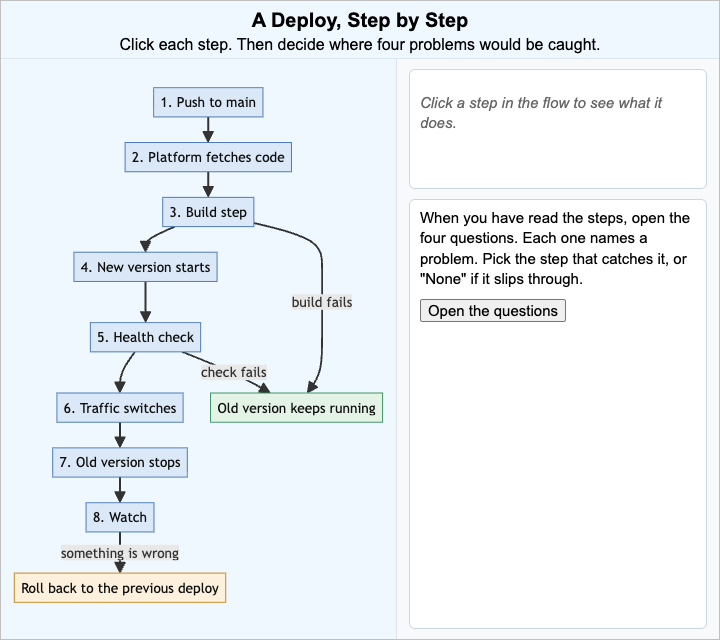
A deploy has more steps than it looks like from the outside. This MicroSim lays out the eight steps a hosting platform such as Railway or Vercel runs when you push to main: push, fetch, build step, new version starts, health check, traffic switches, old version stops, and watch.
Two side branches show the safety net. A failed build or a failed health check leaves the old version running, and members never notice. A third branch shows where a rollback starts.
Then four questions ask where a problem would be caught. Problems 1, 2 and 4 are illustrative. Problem 3, a scan cut off by a deploy, comes from the running example.
How to Use
- Click any step in the flow. The Details box says what that step does. You can also tab to a step and press Enter.
- Press Open the questions. Each question names a problem.
- Pick the step that catches it, or None: it slips through, and press Check. You get one attempt per question.
- The right step gets a solid green outline. If your pick was wrong, it gets a dashed red outline. Read the reason, then press Next question.
Four of four correct shows mastery. Notice that only two steps stop a bad deploy on their own, and both stop only loud failures.
Iframe Embed Code
You can add this MicroSim to any web page by adding this to your HTML:
<iframe src="https://arunbatchu.github.io/good-enough-engineering/sims/deploy-step-by-step/main.html"
        height="644px"
        width="100%"
        scrolling="no"></iframe>
Lesson Plan
Learning Objective
The learner will explain what each of the eight steps of a production deploy does, by naming the step at which each of four given problems would be caught or would slip through.
Grade Level
Adult professional (Good Enough Engineering)
Duration
10-15 minutes
Prerequisites
- Deploy
- Build step
- Health check
- Production environment
- Graceful shutdown
Activities
- Exploration (4 min): Click every step and the two side nodes. Say in one sentence what each step can catch.
- Guided Practice (4 min): Answer the four questions. After each one, find the marked step in the flow and reread its Details.
- Discussion (4 min): Question 4 passes all eight steps. Name two ways you would find that problem sooner: a test, a log, an alert, or a member report.
Assessment
- All four questions answered correctly on the first attempt.
- The learner can say why the health check does not catch wrong answers.
- The learner can say why a scan running in the old version is lost at step 7.
References
- Railway docs: Healthchecks - how Railway decides a new deploy is ready for traffic.
- Vercel docs: Deployments - how pushes to a branch become deploys.
- Mermaid flowchart syntax - the library used to draw this flow.